
List Editor
The chart editor is the main creation surface, but it is not the only one. Motor Sound Editor also provides List Editor, a table-based way to work with keyframe data.
When you need to review, correct, or enter many keyframes precisely, the list editor offers more direct numeric feedback than the chart view.
1. Core purpose
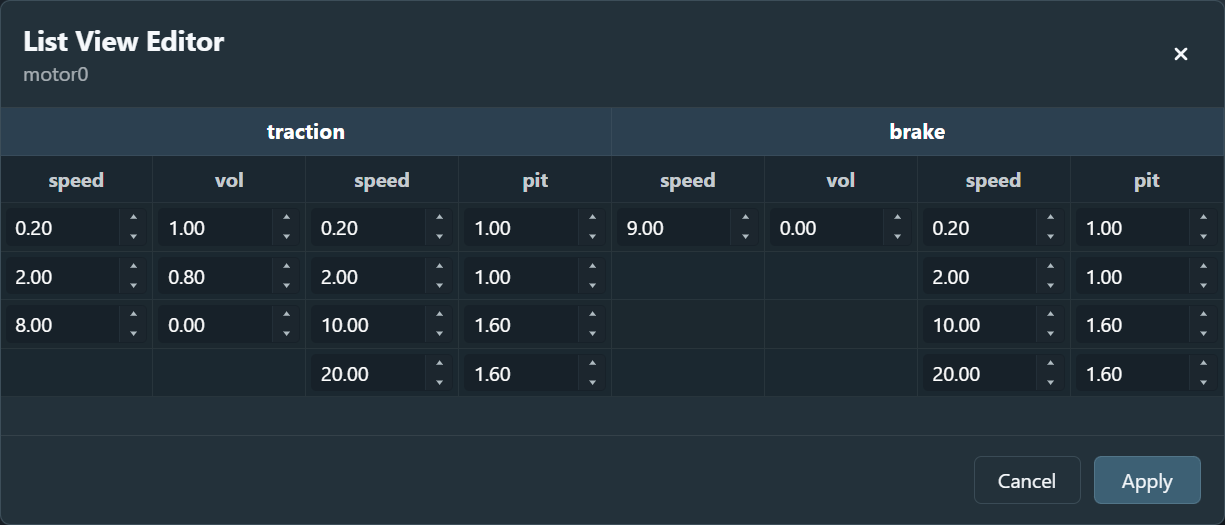
The list editor maps the current track's keyframes into a table so you can manage them more like spreadsheet data.
- Precise input: you can type exact values such as
60.5 km/hor0.85. - Global overview: you can review a whole track's keyframe distribution in one place and catch jumps or redundant points more easily.
- Side-by-side editing: the current implementation shows both Traction and Brake data at the same time, with separate Pitch and Volume columns.
2. Layout
The table is organized into these main areas:
- a Traction section with speed and value columns
- a Brake section with speed and value columns
- separate Pitch and Volume columns inside each section
3. Draft editing model
The list editor uses a draft-based flow:
- edits stay inside the dialog while you work
- Apply writes the draft back to the project
- Cancel discards the current draft
4. Automatic sorting
Keyframes are always sorted by speed. If you change the speed of a keyframe, the visible row order may change automatically so the table remains logically ordered.
5. Right-click context menu
You can open a context menu by right clicking either in the chart area or inside the list editor.
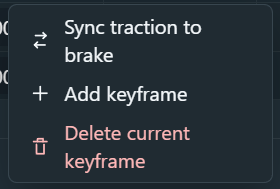
Common list-editor actions currently include:
- Sync traction to brake / Sync brake to traction to copy one side's data to the other
- Add keyframe to insert a new point and let it join the sorted list automatically
- Delete current keyframe to remove the selected point