
Tracks and Audio
Tracks are the basic building blocks of a Motor Sound Editor project. Each track can have its own audio file, color, name, curve data, and visibility state. By organizing several tracks well, you can build complex layered results from high-frequency inverter tones to low-frequency motor body.
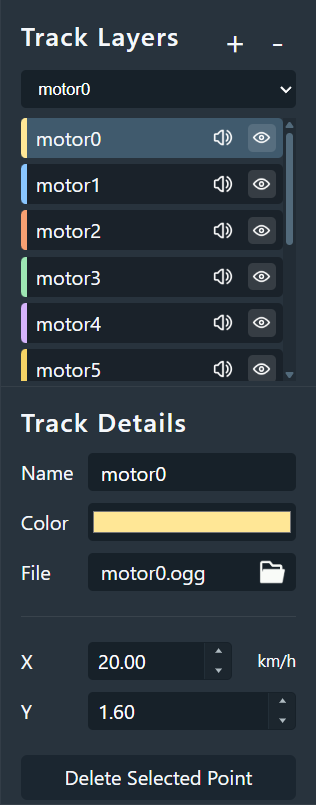
1. Core track concept
Audio in the editor is handled as layers. Each track represents an independent sound layer whose output is driven in real time by the curves stored on that track.
- Active Track: when you click a track in the sidebar, it becomes highlighted and the main chart switches to that track's curves.
- Track Organization: you can group tracks by frequency band or role, such as high, mid, and base layers, to keep the project manageable.
2. Track properties and state
Each track comes with a small set of controls for editing and preview behavior:
- Name: rename the track to something recognizable, such as
Inverter_HighorCooling_Fan. - Color: the chosen color appears in both the sidebar and the chart, making curves easier to distinguish.
- Show / Hide: controls whether the track remains visible in the chart. In the current implementation, hidden tracks are also excluded from preview playback.
- Mute: disables the track's audio output while keeping its editing data intact.
3. Audio asset management
The core of each track is the source audio file bound to it. Motor Sound Editor uses non-destructive editing, so the original file is never rewritten.
- File assignment: click the file picker icon or path area to import audio from the local file system.
- Supported formats: the current build supports
.wavand.ogg. - Looped preview: the editor loops the assigned audio clip automatically, so you only need to shape its behavior through curves.
- Replacing files: when you replace audio, the new file becomes the active resource for that track. Old files are cleaned up during Save or Save As if they are no longer referenced.
4. Curve linkage
Tracks and curve data are bound tightly but remain isolated from one another:
- Separated data: every track stores its own Traction and Brake pitch/volume curves.
- Independent editing: editing keyframes on track A does not affect track B.