
Project Details and Save
This page explains what you can see in the project details dialog, what .msep is for, and how save behavior currently works.
1. Project details
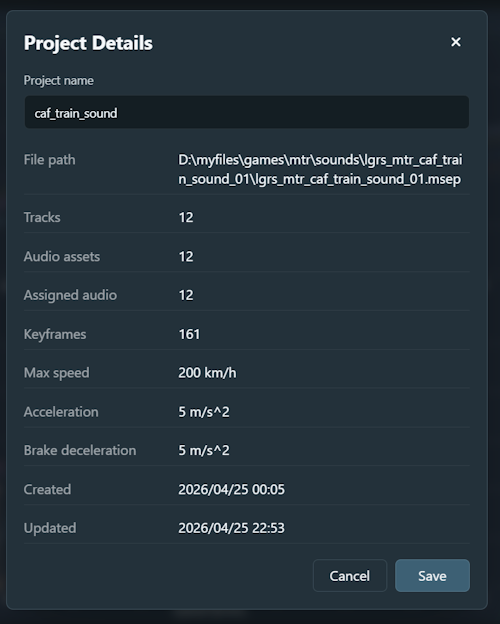
Project Details shows the current project name along with a set of project statistics. In the current implementation:
- Editable field: project name.
- Read-only information: file path, track count, audio-asset count, assigned-audio count, total keyframes, maximum speed, acceleration, brake deceleration, created time, and updated time.
These values are useful when you want to confirm the current state of a project before continuing to edit or preparing an export.
2. The .msep project format
Motor Sound Editor uses .msep as its native project file format.
- Packaged together:
.msepstores project metadata, track definitions, curve data, and packaged audio resources in one file. - Portable: you do not need to manage a separate folder of loose audio files when moving or sharing the project.
- Editable source:
.msepis the editable source project, not the final delivery package.
3. Save and unsaved changes
- Unsaved state: the project becomes dirty when you add tracks, edit keyframes, replace audio, or update the project name.
- Save writes the current document and packaged audio back to the existing
.msepfile. - Save As writes the current project into a new
.msepfile. - Leave confirmation appears before returning home or closing the window if the project still has unsaved changes.
- Undo / redo remains available during the current session even after saving, as long as the app stays open.